
Quick answer: A valid TLS certificate allows browsers to establish an encrypted HTTPS connection with a website. It does not, by itself, certify that the business is trustworthy or that the website is free of malware.
Confirm the certificate covers the correct hostnames and is renewed before expiry. Check website links and redirects after enabling HTTPS.
An SSL certificate on your site gives you the padlock icon in your browser, and this encrypts communications between visitors to your site and the server. Google is now giving sites without SSL certificates a warning in the browser so it is more important than ever to have an SSL certificate on your site.
All sites/domains hosted by Hex Hosting are automatically enrolled in the Auto SSL system – this is included free of charge with all hosting packages on Hex Hosting. This means that as long as the domain points to us (via the nameservers or A record) the system will request an SSL for the domain and install it automatically if it doesn’t already have one. This process is transparent and requires no intervention from you. Generally speaking, it takes 4 hours after pointing the nameservers for the SSL to be requested and installed, but, if it takes longer than this or if your SSL certificate is not working, please let us know. or try the following steps below
- Login to cPanel
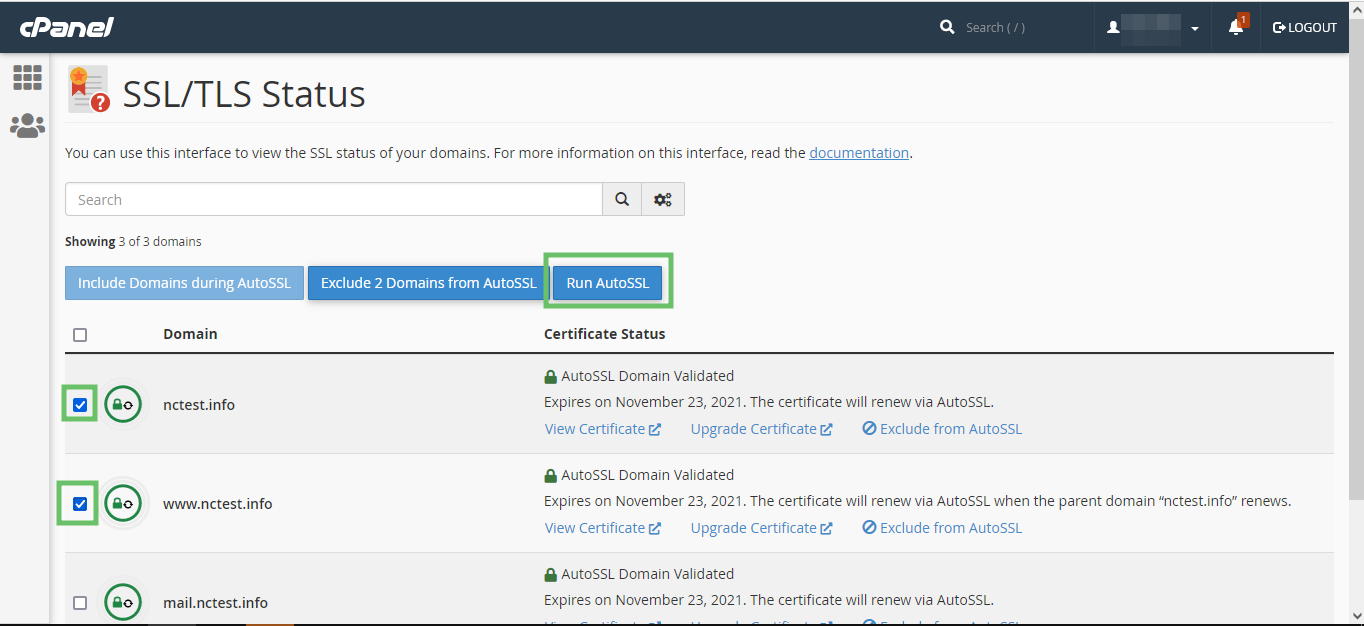
- Go to the “SSL/TLS Status” section in cPanel.

There you will see the list of all the domains and subdomains in cPanel along with their SSL certificates.
- You can select the domains in the list and click “Run AutoSSL” to force AutoSSL installation for them.
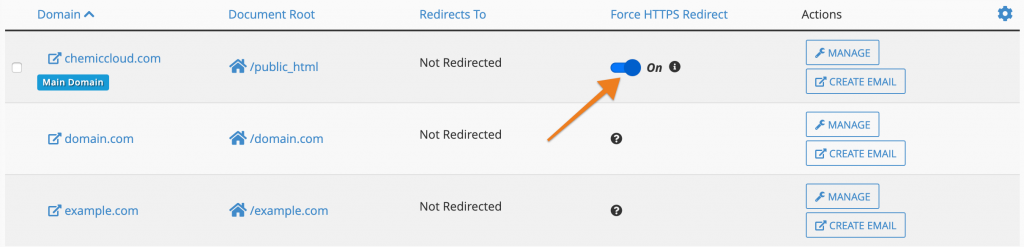
To force your site to work over SSL, generally speaking, you can use a rewrite rule or go to domain and force SSL, e.g.
RewriteEngine On
RewriteCond %{HTTPS} off
RewriteRule ^(.*)$ https://%{HTTP_HOST}%{REQUEST_URI} [L,R=301]
This will redirect all requests for http:// to https:// but it is important that you only do this after your SSL is installed and working.

If you’re running a CMS like WordPress, it is also important to set the Site URL and Homepage in the wp-admin area to include the https://. This is important so that images and stylesheets and so on are loaded over https:// as well. You can also install a plugin such as Really Simple SSL that can help you set these redirections automatically.
For the next steps, read our SSL certificate setup guide.
What an SSL certificate does not guarantee
An SSL certificate encrypts the connection between a visitor and the website, but does not prove the site’s content is trustworthy or that its software is free from vulnerabilities. Check renewal status, certificate hostname coverage and whether embedded images or scripts still load over HTTP. HTTPS should complement regular updates, backups and secure account access.